The HSK (Hanyu Shuiping Kaoshi – 汉语水平考试) is an international Chinese language exam that assesses the written communicative ability of non-native speakers in everyday, academic, and professional situations. This exam is divided into six levels, from HSK-1 (the most basic) to HSK-6 (the most advanced). The HSKK (Hanyu Shuiping Kouyu Kaoshi – 汉语口语考试) is an international Chinese language exam that assesses the oral communicative ability of non-native speakers in everyday, academic, and professional situations. This exam comprises three levels: Basic, Intermediate, and Advanced.
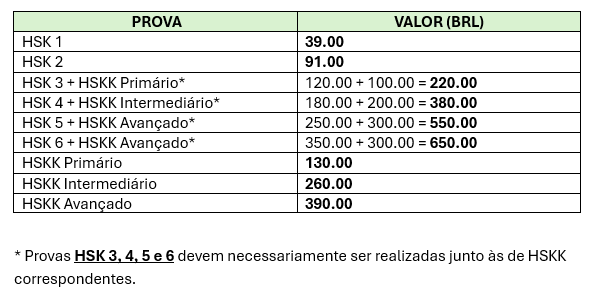
From 01/01/2022, those who register for HSK levels 3 and above (written exam) are required to simultaneously take the HSKK tests (oral exam) at their primary , intermediate , and advanced levels , depending on the level they are applying for.
Check below the table of HSK and HSKK tests to be taken simultaneously, as well as the values of registration fees for the tests.
To fully check the rules for participating in proficiency tests, click the button below.
The Confucius Institute at Unicamp administers the HSK/HSKK tests every six months. When the registration period opens, interested parties will be able to find the registration form for the tests on this page, as well as information regarding dates and deadlines.
how to apply
To register, follow the instructions on the form that will be made available through the pinned post.
rules and guidelines
Here you will find guidance materials for taking the HSK and HSKK online exams offered by Chinese Testing International (CTI) in partnership with the Confucius Institute and Confucius Classrooms ( test centers ). After confirming your registration , that is, after paying the fee and confirming your registration with the responsible test center , follow the steps below.
The attached material is mostly in English, however, there are instructions in Portuguese and specific difficulties can be resolved via WhatsApp with the instructors in charge. Please note that these rules are subject to change at any time and that specific guidelines may be provided by your test center depending on the edition of the exam taken.
Requirements
Computer with operating system Windows with installed camera or webcam. It is not possible to carry out the test using other systems or MAC. Some participants have used Parallels to run Windows on their machines.
Smartphone with the Zoom Meetings app installed.
Isolated and quiet home environment without interruptions from other people.
Headphones or headset.
If you are taking HSK level 3 or above, you need to download the Chinese keyboard or activate it in the language preferences on your computer. Quick language switching: “Alt + Shift”
Before the exam
Step 1 —
To be able to take the test on your computer, you must download the Exam Client program
Attention : This link may be active/inactive or changed depending on the exam edition, so it is necessary to confirm it with the responsible professor. After downloading, extract the files from the zipped folder and run the program installation, following the instructions in the following guide:
If the installer fails to run, download the additional "dependency files" (see the guide). Installation problems may persist if one or more of the following specifications are not met:
Desktop: Windows (7/8/10) operating system, recommended screen resolution setting is1440*900 and above (the minimum setting is 1366*768 and above). Make sure the operating system installed on your device is 64 bits (path: control panel –system and safety – system). Or stop running any anti-virus software.
Software: Download and install the client software of Online Chinese Test (Home Edition)
Network: Internet speed 100KB and above.
Camera: HD (more than 300,000 pixels). The room should also be well-lit and the camera unobstructed.
Headphones: clear with good sound insulation.
Microphone (for HSKK): clear recording with no noise.
After successful installation, carry out tests to check that everything works normally, as indicated in the tutorial kindly provided by our student Henrique Shigihara. Once again: if problems persist, speak to the responsible teacher.
Step 2 —
Registration on the website and download of the "Admission Ticket" : some test centers usually carry out this part of the registration online for participants, after confirmation of their payment and receipt of documents ( as is the case with the Confucius Institute at Unicamp ).
This step is conducted by the Confucius Institute at UNICAMP; participants should not register on the Chinese Test website.
It is necessary to create a login using a valid email and password. The participant must pay attention to the information and, in the end, generate an Admission Ticket similar to the one in the image, filling it with their information:
Attention : The information provided must be identical to that on your identification document and login credentials, as this will be essential for your correct identification on the day of the exam and subsequent issuance/consultation of your certificate and other online services. If you have any questions, please ask your teacher for assistance.
During the exam
Dance
To ensure the safety of the test, the test center will collect your information, including your name, photo, identification information, and audio or video monitoring recordings during the test. All collection and use of this information will be limited by law and the legal purposes of the CTI. This video illustrates how this can be done.
Rules
Computer and cell phone must be connected to power and with both cameras turned on throughout the entire test period.
The computer camera must focus on the participant's face and shoulders completely and without shadows.
The cell phone must be positioned (in airplane mode) one meter away to the left or right of the participant's back so that the examiners can see their computer screen and desk.
The participant must be logged in to the Zoom meeting link to take the exam on their computer AND cell phone simultaneously.
The use of any unauthorized materials, including mobile devices, handwritten notes, or textbooks, is prohibited during the test. No pieces of paper are allowed during the test. Copying or recording test questions and topics is prohibited.
The participant cannot get up, move around the environment where they are taking the test or leave it during the exam.
Instructions
The Zoom meeting link for the test will be sent 1 hour before the start of the test.
Log in to the Exam Client (no later than 10 minutes before the test) to prepare for the test. There will be no additional time if you are late because of problems with personal equipment, network, etc.
The system will automatically log you in one minute before the test. The content of the listening options will be available, but you will not be allowed to respond until the test begins.
The time is controlled by the Chinese online testing system and the remaining time will be shown on the screen.
Constructing sentences written in HSK 3-5 parts can be completed by dragging and dropping the mouse. Do not click too often to increase server loads. The written portion of the test must be typed in Chinese using Chinese Pinyin.
The system will enter the next part of the test automatically after the current part ends. You will not be able to continue your answer if you click the “submit” button in the top right corner of the interface to end the test.
The system will send the answers automatically after the entire test is completed.
after the exam
Result query (result inquiry)
You can log in to the test website 10 days after the HSK exam and 25 days after the HSKK exam to check your score. Enter your admission ticket number and name to obtain the report. The report can only be printed once.
Extra Score Report (result report query)
After the results are released, you can log in to the website and select the "Register for Extra Points Report" button ( result report query ). It is also possible to request a physical copy of the certificate. Please note that the cost of airmail shipping is not included in the previous registration fees and must be paid separately by participants who wish to receive a physical copy.
Further reading
It is strongly recommended that you read the following material, containing both the information indicated above and others of equal importance.
We reiterate : if in doubt, seek guidance from the test center where you will be taking your exam, following the instructions given directly by the professors responsible for the edition you will be taking.